


Capacitive Touch Membrane Switches
A capacitive membrane switch is a touch sensitive switch that activates when the user makes contact with the sensor. The membrane switch uses capacitive sensing technology to perform the functions of a traditional membrane switch with a simple, light touch.
Capacitive touch membrane switches offer great design flexibility, durability, and a sleek appearance. The technology in this style membrane switches use conductive carbon printed circuitry to create an electrical field. When a human finger touches the key, an increase in the capacitance is recognized by the IC, which activates the output of the key.
Here is a how-to guide for capacitive touch switches [video].
At a Glance: Capacitive Touch Membrane Switches
- Capacitive touch membrane switches use capacitive sensing technology to detect a user's touch without requiring mechanical contacts, providing a sleek, durable, and highly reliable user interface solution.
- The absence of moving parts significantly extends product life while enabling advanced features such as multi-touch functionality, sliders, scroll controls, curved surfaces, and customizable backlighting.
- Capacitive touch technology is widely used across medical devices, industrial equipment, consumer electronics, kiosks, appliances, and other applications that require easy cleaning, modern aesthetics, and long-term reliability.
Advantages of Capacitive Touch Membrane Switches
- Sleek Appearance
- Robustness and Durability
- Ease of Maintenance
- Flexibility in Customization
- Light Touch Activation
- Scroll and Slider Designs
- Multi Touch Capability
- Curved Interface Design
- Flexibility in Functions and Communication Interfaces
- Backlighting Options
Applications Using Capacitive Touch Technology
- Medical Devices
- Portable Devices
- Appliances
- Consumer Electronics
- Personal Computer
- Gaming
- Hospitality
- Industrial
- Kiosk
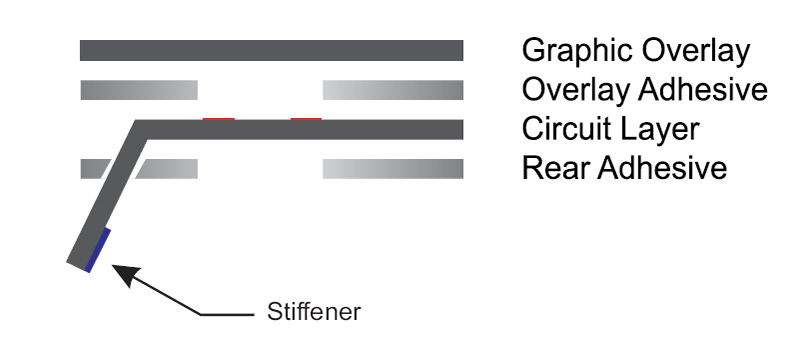
Mechanical Structure of a Capacitive Touch Membrane Switch
More Durable Than Traditional Membrane Switches
One of the main advantages of capacitive touch membrane switches is that there are no moving mechanical components that undergo thousands of actuation cycles like metal domes in traditional membrane switches. This key advantage significantly extends the life of the product and makes it much more durable than its traditional alternative. The overlay material can be glass, acrylic, polyester, or polycarbonate. The smooth top surface allows for quick wipe downs and is able to withstand harsh chemicals. These advantages make this solution extremely appealing for medical applications. Find out more with this blog post, Capacitive Touch HMI Overlay and Materials. We utilize our proven design techniques to completely seal the perimeter of the membrane switch from moisture, dust, and other environmental contaminants.
Improved Esthetics
Capacitive touch membranes are an excellent solution for customers who are looking to redesign their existing, outdated product. With a sleek, glossy interface and uniform backlighting options, capacitive touch membranes can provide your existing product a major esthetic and functional improvement. Learn how to incorporate transparent capacitive touch switches.
HMI Design & Integration
At Epec, our focus is on the design and integration of many components, including touch technology, into a high reliability, feature-rich user-interface. We can incorporate everything from micro-processors, embedded controllers; LED, LCD, or VFD displays; and backlighting options to include: discrete LEDs, EL, light panels, or fiber-optic. With our global manufacturing capabilities and our world class clean room assembly facility in New Bedford, MA, Epec can meet all of your capacitive switch needs.
Look into this more here, Smart HMIs - Capacitive Touch Technology for Medical Devices.
Frequently Asked Questions
Quick Links
- What is a capacitive touch membrane switch?
- What advantages do capacitive touch membrane switches offer over traditional membrane switches?
- What materials can be used for the overlay?
- Why are capacitive touch membrane switches popular in medical applications?
- What design features can be integrated into a capacitive touch membrane switch?
What is a capacitive touch membrane switch?
A capacitive touch membrane switch is a touch-sensitive interface that detects changes in capacitance when a user's finger contacts the sensor area. The sensing circuitry recognizes the change and activates the corresponding function without requiring mechanical switch movement.
What advantages do capacitive touch membrane switches offer over traditional membrane switches?
Capacitive touch switches provide greater durability because they contain no moving mechanical components that wear out over time. They also offer a modern appearance, light-touch activation, improved sealing, easier cleaning, and support for advanced interface features such as multi-touch and slider controls.
What materials can be used for the overlay?
Capacitive touch membrane switches can utilize overlay materials including glass, acrylic, polyester, and polycarbonate. These materials provide a smooth, easy-to-clean surface while supporting various aesthetic and environmental requirements.
Why are capacitive touch membrane switches popular in medical applications?
The sealed construction helps prevent the ingress of moisture, dust, and contaminants, while the smooth surface can withstand frequent cleaning and exposure to harsh chemicals. These characteristics make capacitive touch technology well suited for medical and healthcare environments.
What design features can be integrated into a capacitive touch membrane switch?
Capacitive touch interfaces can incorporate microprocessors, embedded controllers, LCDs, LEDs, VFD displays, multiple backlighting technologies, communication interfaces, curved surface designs, touch sliders, scroll functions, and multi-touch capabilities within a single HMI solution.
Experience Next-Generation Touch Technology
Upgrade your product's performance and aesthetics with Epec's capacitive touch membrane switches. From medical devices to industrial applications, our switches offer unparalleled durability and customization.
Request a Quote Request Design Support Request More Information
Request a FREE Quote!
We are here to help you with all your custom user interface needs.
Get Your Quote Now! Not Ready for a Quote? Request more info or email us your inquiry.